
What it does
Sphen.ai can prepare translations for storefront languages you have already added in Shopify, in the writing style you choose and with your protected terms left untouched. Every translation is a proposal you review before it reaches Shopify, and every pushed translation can be reverted. Language settings live under Settings → Brand; the review queue lives on Recommendations, in the Translations tab of the All recommendations table.
Why it matters
A half-translated storefront is worse than a monolingual one: shoppers hit language gaps mid-funnel, and AI assistants answering in that language cite whoever wrote a complete page. Translating titles, descriptions and SEO fields in bulk turns each existing Shopify language into a market that can actually be found.
Setup
Add the languages you want in Shopify first. Sphen.ai only prepares translations for languages that already exist in your store; the card links out with Manage languages in Shopify.
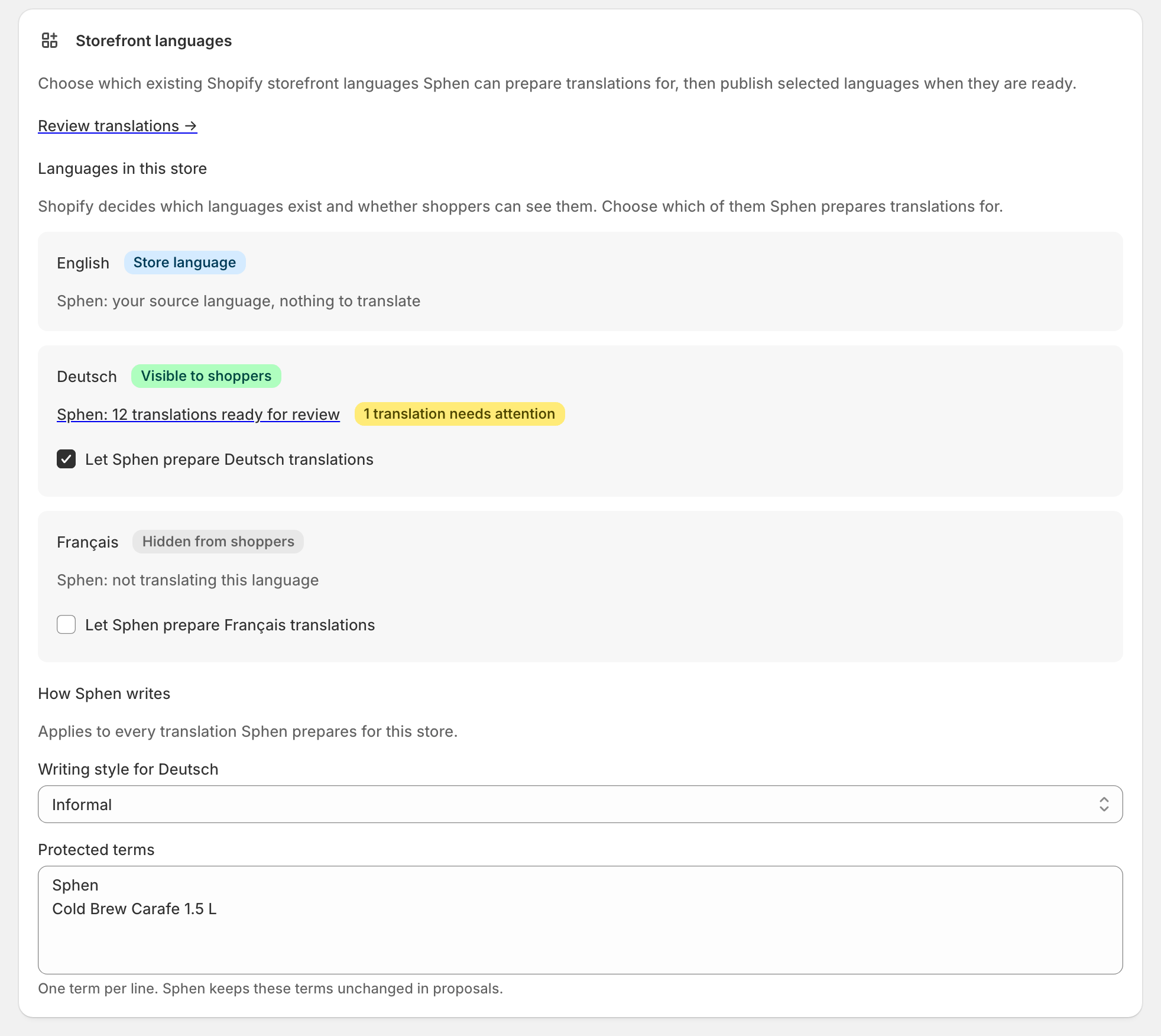
Open Settings → Brand and find Storefront languages. If prompted, press Grant permission — Sphen.ai needs write access before it can push translations.
Under Languages in this store, tick each language Sphen.ai should prepare translations for.
Set Writing style per language (Match source, Informal or Formal) and list your Protected terms — brand and product names — one per line. Press Save language settings.
Go to Recommendations, open the Translations tab of the All recommendations table and press Generate translations. Nothing is written to Shopify at this stage.
Review the Proposal column against Source, then push with Push per row or Push all ready.
Publishing a language to shoppers is a separate, deliberate step: back in Storefront languages, press Publish to storefront and confirm.
Reading the results
Statuses tell you exactly where each proposal stands. Ready to push is reviewed and waiting; Pushed is live in Shopify. Existing translation kept means a translation was already there and Sphen.ai did not overwrite it — use Overwrite if you want yours instead. Changed elsewhere means someone edited it in Shopify after generation; Source changed means the original text moved and the proposal should be regenerated before pushing. Needs attention is a failure to retry.
Per language, the summary line reads like a progress bar: from no translations prepared yet through n translations ready for review to translations published to Shopify. A good end state is every targeted language at published, with zero rows in Changed elsewhere or Source changed.
Publish a language only once its core content is translated. Anything without a translation falls back to your store language, so publishing early means shoppers see a mixed-language storefront.
Troubleshooting
Sphen.ai says permission can only be requested inside Shopify Admin.
You are viewing the app outside the embedded admin. Reopen Sphen.ai from your Shopify admin and request the permission there.
Ready translations can't be pushed.
They are probably in a language you no longer target. Re-enable that language under Settings → Brand → Storefront languages and push again.
A revert says there is nothing to revert.
The live translation already matches the value you would restore. Nothing is wrong and no change was needed.
Frequently asked questions
Does generating translations publish the language?
No. Generating creates proposals, pushing writes them to Shopify, and publishing makes the language visible to shoppers. Those are three separate decisions.
Will Sphen.ai overwrite translations we already had?
Not on its own. Pre-existing translations are marked Existing translation kept, and replacing one requires an explicit Overwrite with a confirmation.
Which fields get translated?
Title, description, SEO title and SEO description on products and collections.
Still stuck?
Support answers installation, catalog sync, audit, billing, privacy, and account questions for the SPHEN.AI Shopify app.