
Invisible coverage
Reviews, blog posts and news pages mention brands every week, and nobody on the team sees them.
Mentions · Mention monitoring
The Mentions tab lists every page on the web that mentions your store or a tracked competitor, and marks the ones AI assistants actually cited in their answers.
In short
Mention monitoring is the Mentions tab in Sphen.ai. It lists the pages on the web that mention your Shopify store or one of your tracked competitors, and marks the pages AI assistants cited in their answers. You filter by type, brand and citation status. Monitoring only reads the web and never contacts anyone.
Updated:
The problem
Reviews, blog posts and news pages mention brands every week, and nobody on the team sees them.
A page AI assistants cite shapes answers. A page they ignore does not — and you can't tell which is which.
When a roundup names two competitors and not you, that gap repeats in every answer built on it.
How it works
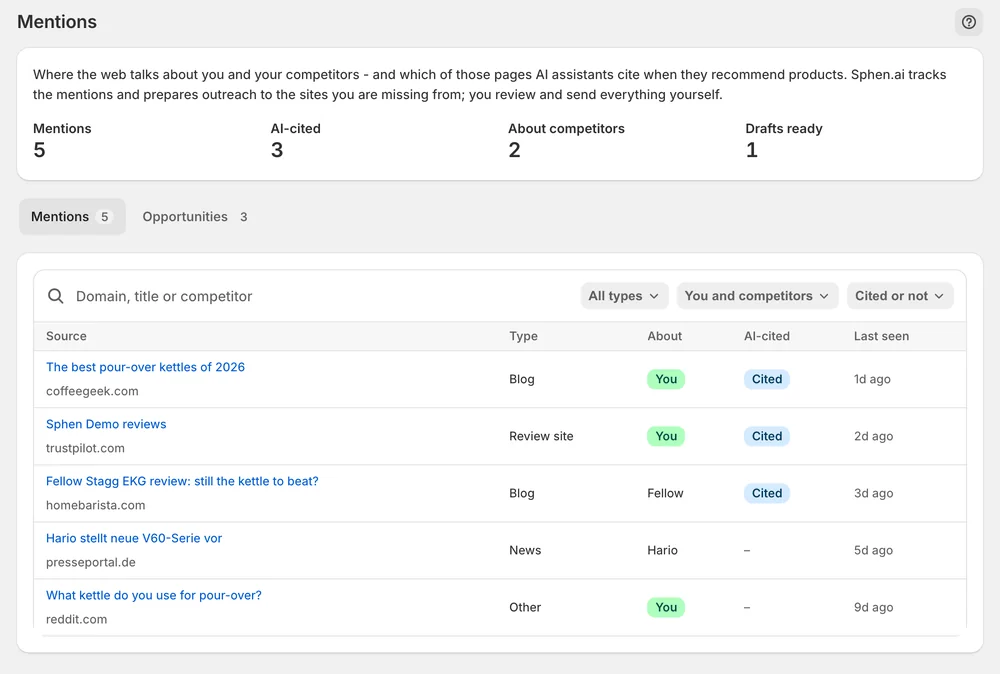
Counters show mentions, AI-cited pages, pages about competitors and drafts ready. The About column says whether a page is about you or a competitor; AI-cited pages sort first.
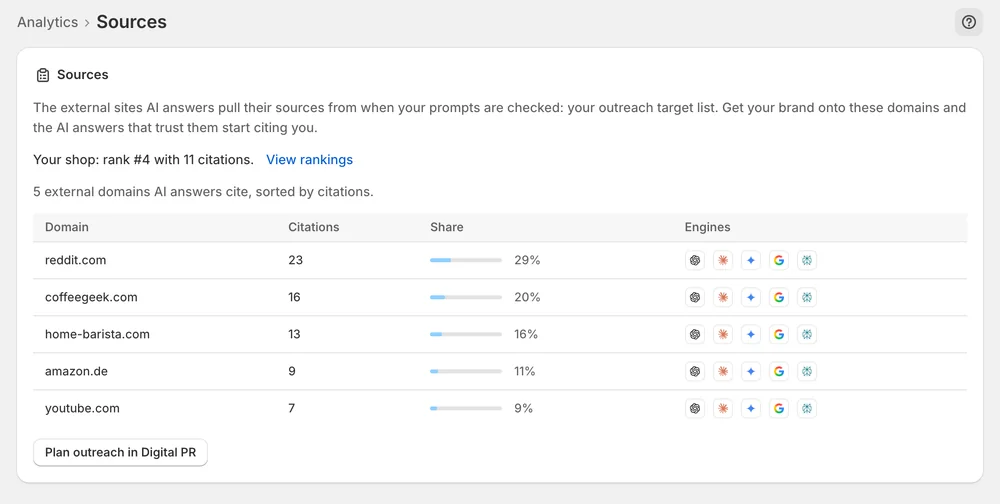
The Sources deep dive on Analytics ranks the external domains AI answers cite when your prompts are checked — the context for which mentions carry weight.
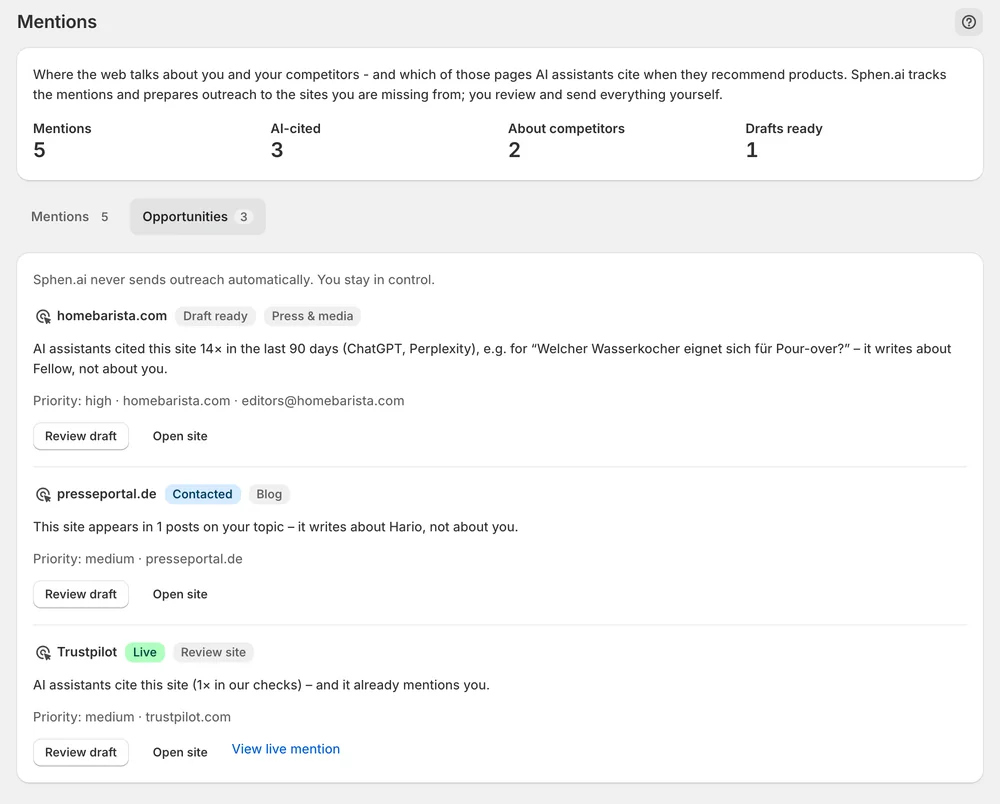
Sites that AI cites for your topics but that don't mention you become rows on the Opportunities tab.
In the app
Four counters sit above the table. Mentions counts the pages found that mention you or a tracked competitor. AI-cited counts the pages among them that AI assistants cited in their answers. About competitors counts mentions that concern a competitor instead of you. Drafts ready counts the outreach drafts that wait for your review on the Opportunities tab.
Each row is one page. The About column tells you whether the page is about you or names a competitor, and AI-cited marks pages that already carry weight in AI answers. AI-cited pages sort first. Narrow the table with the filters All types, You and competitors, and Cited or not, or search by domain, title or competitor and press Enter. Clear resets the search.
On Analytics, open the AI visibility deep dives dropdown and pick Sources. The page ranks the external domains that AI answers cite when your prompts are checked, and flags the ones that cite a source but not you. Read it next to the Mentions table. It gives you the context for which mentions carry weight and which sites belong on your target list.
You stay in control
Plans
Included in every plan, with no separate quota.
Once monitoring is running, the first mentions and opportunities take a few days to accumulate. Monitoring is set up for your store as part of onboarding and does not switch itself on at install. Qualified opportunities build up slowly, so check back after a few days.
Give it a few days first. If both tabs are still empty after that, monitoring has most likely not been switched on for your store yet. Contact support and ask for it. If the page reports a load failure instead, press Retry and check Activity.
The page was cited by an AI assistant in its answer to one of your tracked prompts. These pages already carry weight in AI answers, so they are the ones worth being on. In the table they sort first, and the Cited or not filter narrows the list to them.
The Mentions tab sorts pages into blog, news and review site. You pick one with the All types filter. Each page is also marked as being about you or about a tracked competitor, so you can look at your own coverage and theirs separately.
No. Monitoring only reads the web. Outreach happens on the Opportunities tab, and there Sphen.ai only prepares drafts. You review and edit each draft and send it from your own inbox. Sphen.ai never sends anything on your behalf.
A filter or search is active. Press Clear next to the search field, or set the three filters back to All types, You and competitors, and Cited or not. The table then shows every mention again, with AI-cited pages first.
Install Sphen.ai, let it read your store, and decide exactly what goes live.
