
No baseline
Without a number for today, there is no way to tell whether last month's catalog work made the store easier to read.
Catalog audit · Readiness score
Sphen.ai checks every product for the signals AI assistants and search engines rely on, then sums it up as a score out of 100 with the fixes that move it most.
In short
The AI readiness score is a single number out of 100 that shows how well search engines and AI assistants can read your Shopify catalog. Sphen.ai checks every product for missing descriptions, attributes and structured data, then shows the score, the count of products that are not AI-ready yet and your top fixes.
Updated:
The problem
Without a number for today, there is no way to tell whether last month's catalog work made the store easier to read.
The hero products look fine. The hundreds behind them are where descriptions, brand fields and GTINs go missing.
A flat list of issues does not say which fix to do first.
How it works
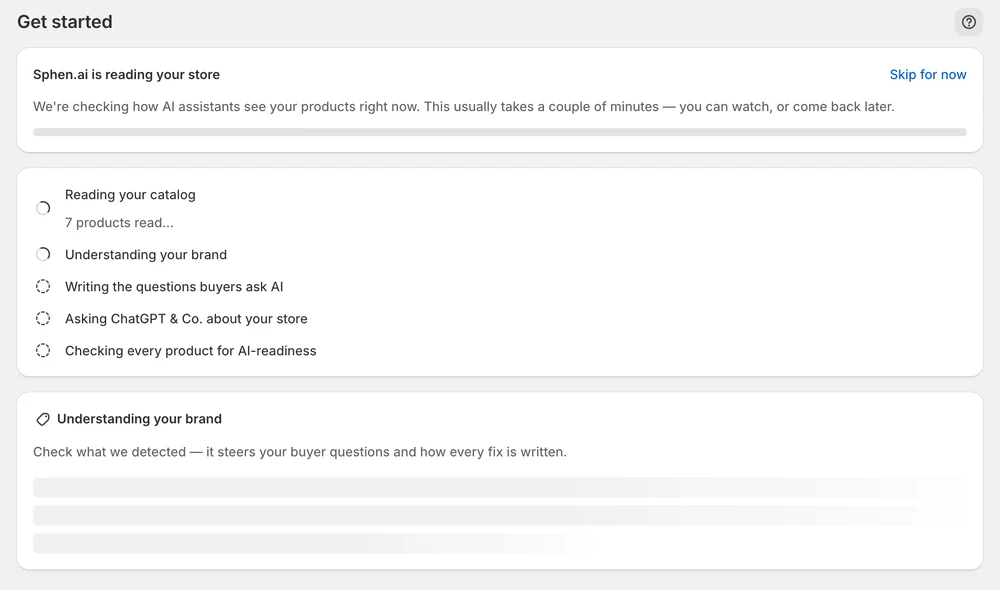
The last step of the first run is Checking every product for AI-readiness. It runs in the background, so you can leave the page.
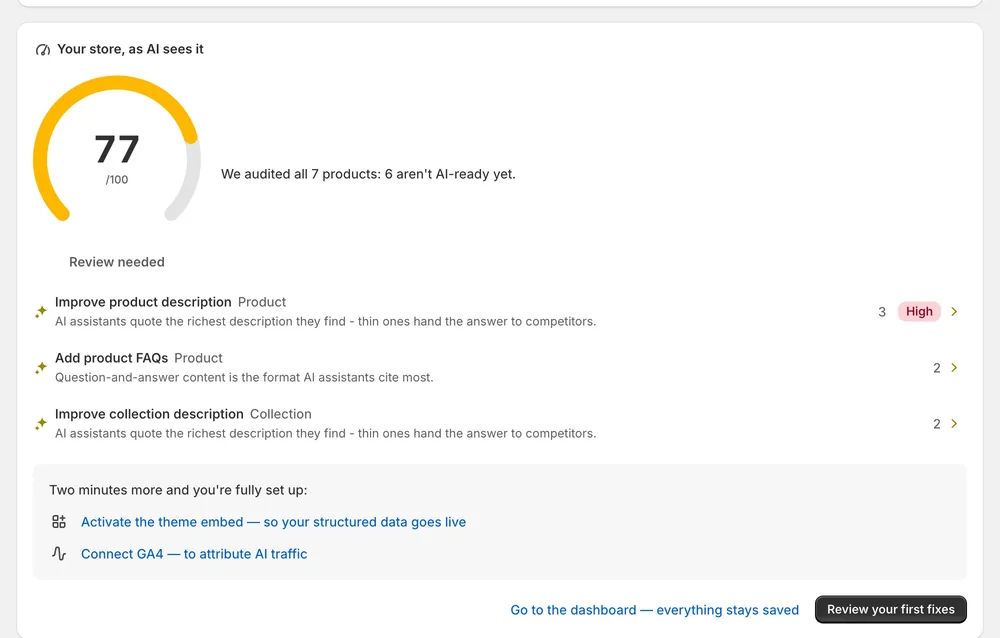
Your store, as AI sees it shows the readiness score, how many products are not AI-ready yet, and your top fixes.
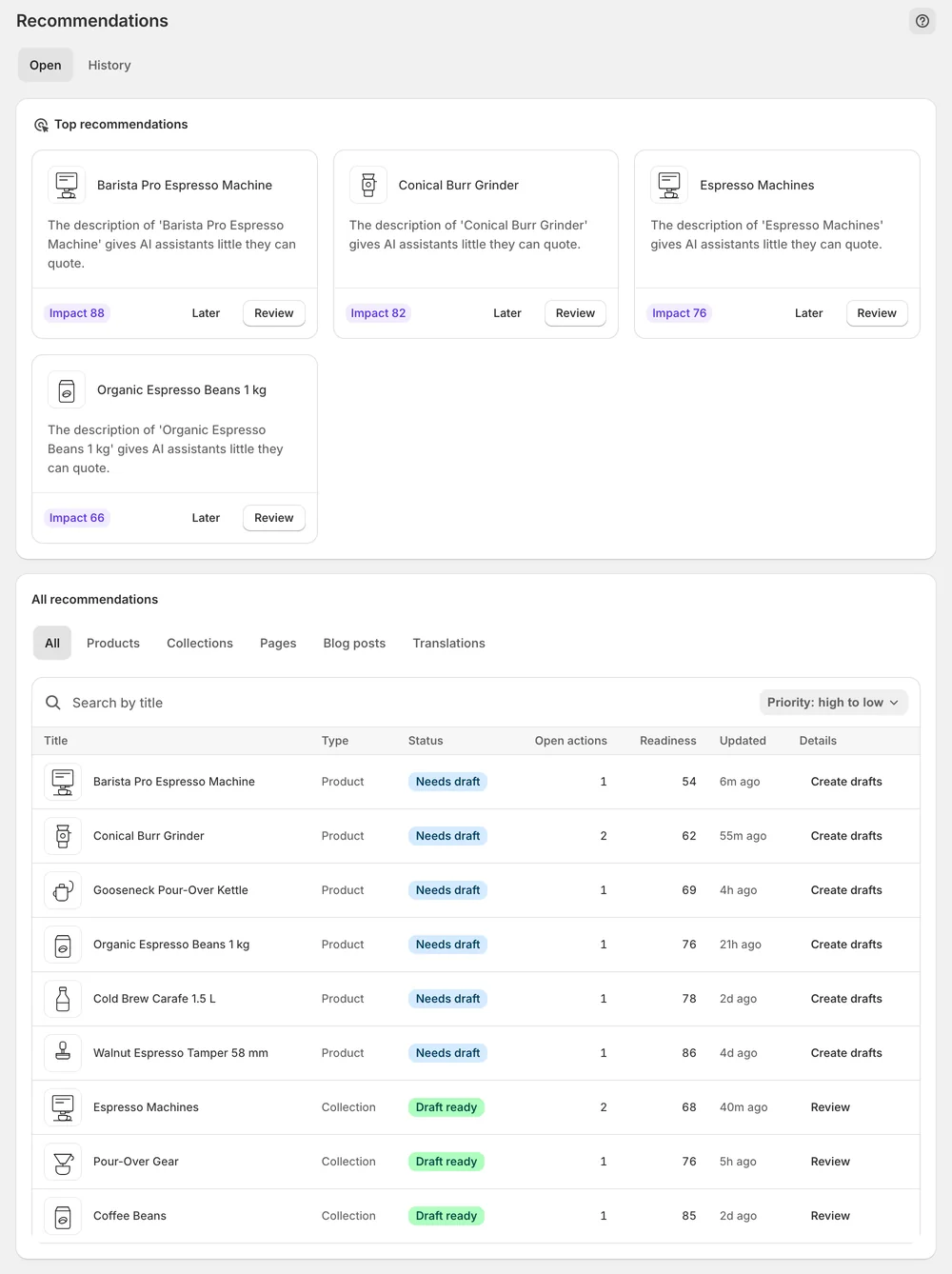
Review your first fixes opens Recommendations, sorted so the highest-impact changes come first.
In the app
When the first audit finishes, Get started reveals Your store, as AI sees it. You see the readiness score, how many products are not AI-ready yet and your top fixes. The audit is the last step of the setup pipeline and runs in the background, so you can close the page and come back when the results are in.
Review your first fixes opens Recommendations. The Open tab starts with Top recommendations, your highest-impact fixes as cards, each with an impact score and a Review button. Below it, the All recommendations table lists every open action. You can search by title, sort by priority and narrow by object type, so the long tail of the catalog stays workable.
Some gaps cannot be drafted. The No AI fields badge marks items where every open action is a field no AI can invent, such as vendor, category or GTIN. Those need a manual edit in Shopify. Everything else gets a draft you can edit, refine, apply or dismiss. Nothing reaches your storefront until you press Apply.
You stay in control
Plans
product audits per month
How complete and machine-readable each product is for search engines and AI assistants. The audit looks at descriptions, attributes, alt text, structured data and related signals. Missing brand or GTIN fields and structured data that cannot be read are typical reasons a product counts as not AI-ready yet.
No. The score measures whether your catalog can be understood, not whether an assistant recommends you. Whether AI engines cite your store is measured separately by AI visibility scans, which ask real buyer questions and record whether your store appears in the answer.
Apply recommendations. Each applied fix closes a gap that the next audit picks up. Start with Top recommendations, because they are sorted by impact. For fields marked for manual editing, such as vendor or GTIN, update the value in Shopify yourself.
No. Scoring only reads your catalog. Every fix behind the score is a draft that you approve, edit or dismiss, and it is written to Shopify only when you press Apply. Applied changes can be reverted later from the History tab in Recommendations.
First audit results usually appear during setup, within minutes. Large catalogs take longer because the audit scales with catalog size. It runs in the background, so you can leave the page. Your progress, profile and questions are saved while it works.
That depends on your plan. Each plan includes a monthly allowance of product audits, and the allowance resets at the start of the next month. You can check how much you have used under Settings → Plans. Existing data and applied changes are not affected by a limit.
Install Sphen.ai, let it read your store, and decide exactly what goes live.
