
Visibility without revenue
Knowing an assistant mentions you does not tell you whether that turns into sales.
Impact & attribution · AI order attribution
Sphen.ai attributes orders and revenue to the AI assistant that referred them — ChatGPT, Perplexity, Gemini, Claude, Copilot — from your own Shopify order data.
In short
AI order attribution assigns Shopify orders and revenue to the AI assistant that referred the buyer: ChatGPT, Perplexity, Gemini, Claude or Copilot. It is derived from your store's own order data, not from an extra tracking script. Only orders Sphen.ai can positively attribute are counted, so the figure is a floor, not your total AI revenue.
Updated:
The problem
Knowing an assistant mentions you does not tell you whether that turns into sales.
AI-referred buyers blend into direct and other traffic unless someone separates them.
Estimates that extrapolate AI revenue are hard to defend in a budget meeting.
How it works
Attribution is derived from your Shopify orders through the app's orders access. There is no extra tracking script to install.
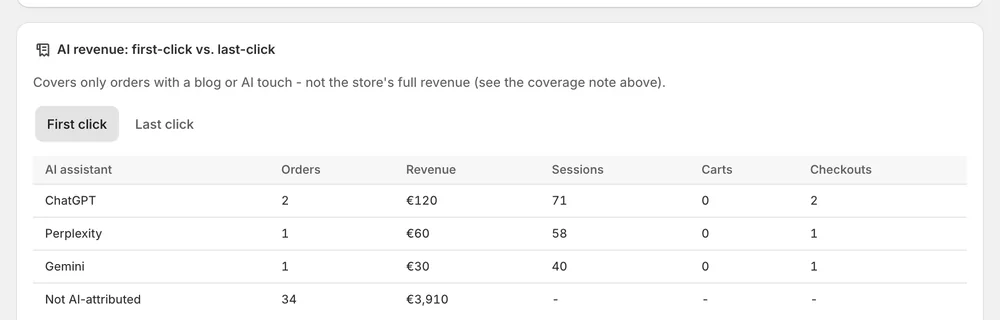
Orders and revenue are assigned to the assistant that referred them, so you can see which one sends buyers.
Read attributed orders alongside citation share per assistant, and see whether being cited and being bought move together.
In the app
A table lists attributed orders and revenue for each assistant: ChatGPT, Perplexity, Gemini, Claude and Copilot. It shows first click next to last click. That tells you which assistant sends buyers, not only which one mentions you. Every figure counts only orders Sphen.ai can positively attribute, so read it as a lower bound. Nothing in the table is modelled or extrapolated.
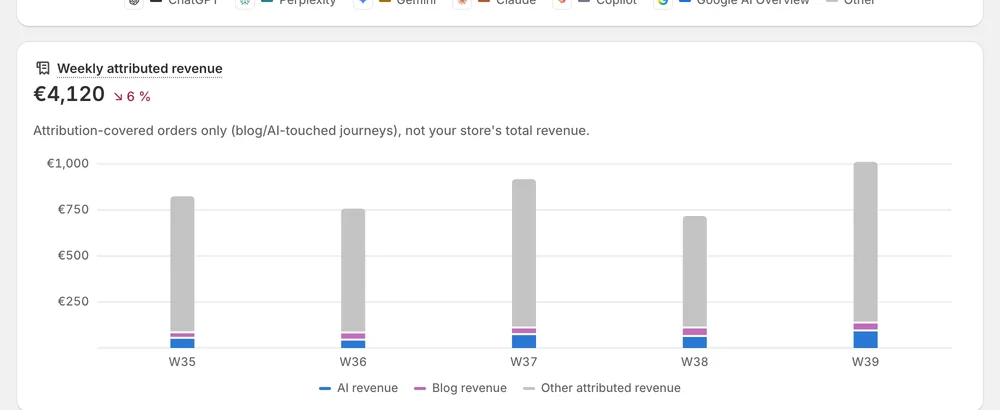
A weekly view shows attributed revenue from AI and blog traffic. You can follow how attributed revenue develops from week to week instead of looking at one total. Read it next to citation share per assistant to see whether being cited and being bought move together. The screens on this page show a demo store, so the figures in them are not results.
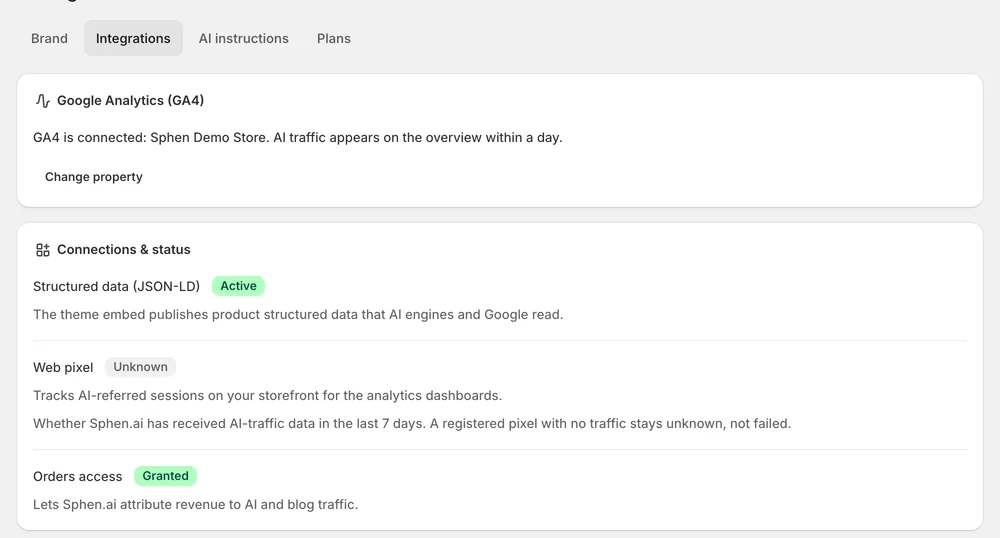
Connections and status shows GA4, structured data and orders access. Attribution relies on orders access, which comes from the permissions granted when you install the app. There is no extra tracking script to install. If the app shows Reinstall required, reopen Sphen.ai from your Shopify admin so the missing permission can be granted. Sphen.ai reads orders for attribution and never changes them.
You stay in control
Plans
Included in every plan, with no separate quota.
ChatGPT, Perplexity, Gemini, Claude and Copilot. Orders and revenue are split by assistant, so you see each one separately. An order only appears under an assistant when Sphen.ai can positively attribute it to that assistant. Nothing is modelled or extrapolated to fill gaps.
No. It is deliberately conservative: only orders Sphen.ai can positively attribute to an assistant are counted, so the real number is higher. Read the figure as a lower bound and a trend line, not as the complete revenue that AI assistants bring to your store.
From your store's own Shopify order data, read through the permissions granted at install. No third-party data is involved, and there is no extra tracking script to install. Sphen.ai only reads orders for attribution. It never changes an order.
No. Attribution is order-based. Session figures depend on a Shopify customer-data approval that is still pending, so the AI sessions tile in Analytics shows “—” for now. That is the expected state for every store, not a setup mistake on your side.
Because they are sample data. Development stores show sample data as a preview, marked with a Sample data banner. Real analytics replace it automatically once the store has live visitors and orders. Until then, do not read those figures as results of your store.
No. A citation tells you that an assistant mentions your store. It does not tell you whether that turns into sales. That is why Sphen.ai shows attributed orders next to citation share per assistant, so you can see whether being cited and being bought move together.
Install Sphen.ai, let it read your store, and decide exactly what goes live.
