
Borrowed authority
Assistants lean on review sites, blogs and magazines. If those pages never mention you, the answer will not either.
AI visibility · AI sources
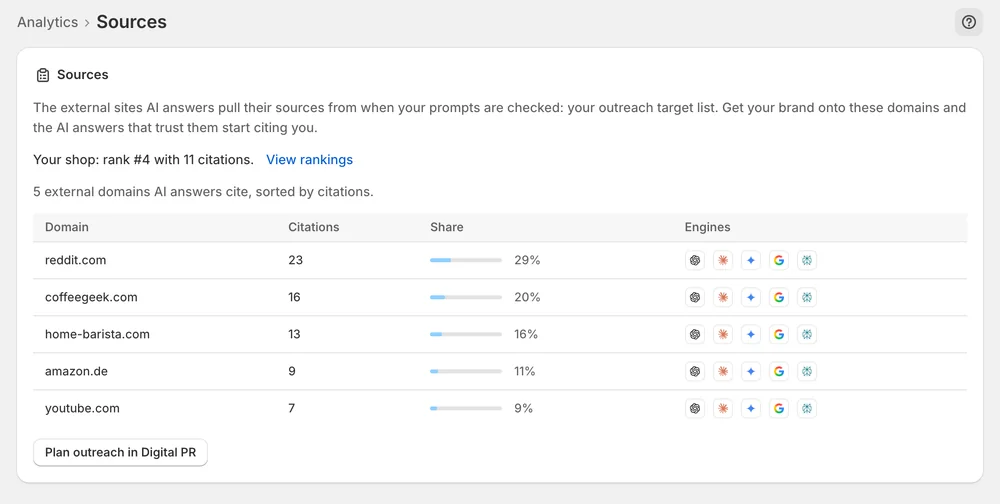
The Sources deep dive ranks the external domains that AI answers cite for your tracked prompts, with their citations, share and engines.
In short
Sources ranks the external domains that AI answers cite when your tracked prompts are checked. Each domain shows its number of citations, its share and the engines that cited it. You use the list to see which review sites, blogs and shops assistants rely on, and to pick outreach targets for Mentions.
Updated:
The problem
Assistants lean on review sites, blogs and magazines. If those pages never mention you, the answer will not either.
Pitching every site in your niche wastes time. Only a few domains actually feed the answers.
Each assistant cites a different set of sources. A site that matters for Perplexity may not matter for Gemini.
How it works
Sources lists every external domain cited for your prompts, with its number of citations, its share and the engines that cited it.
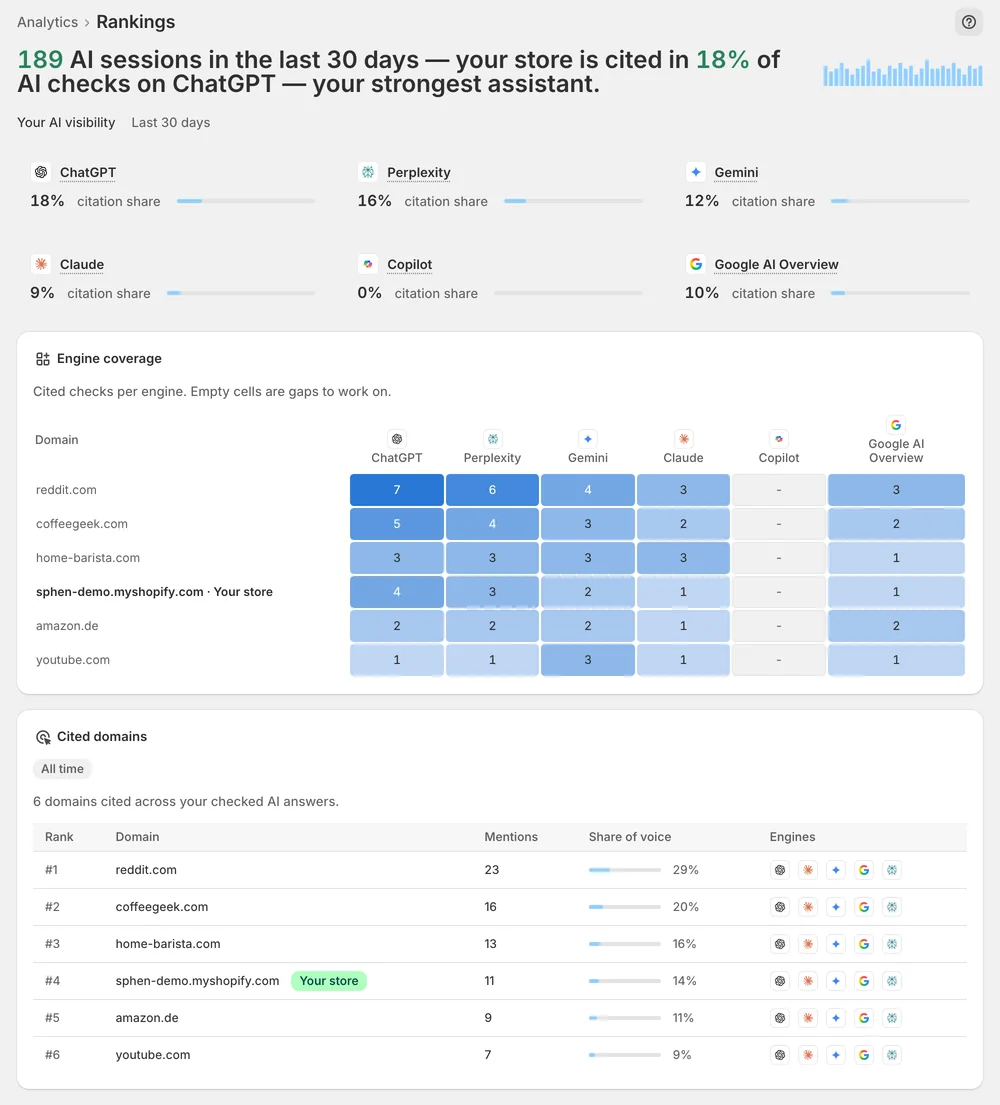
The Cited domains table in Rankings shows where your own domain sits next to the review sites and shops above you.
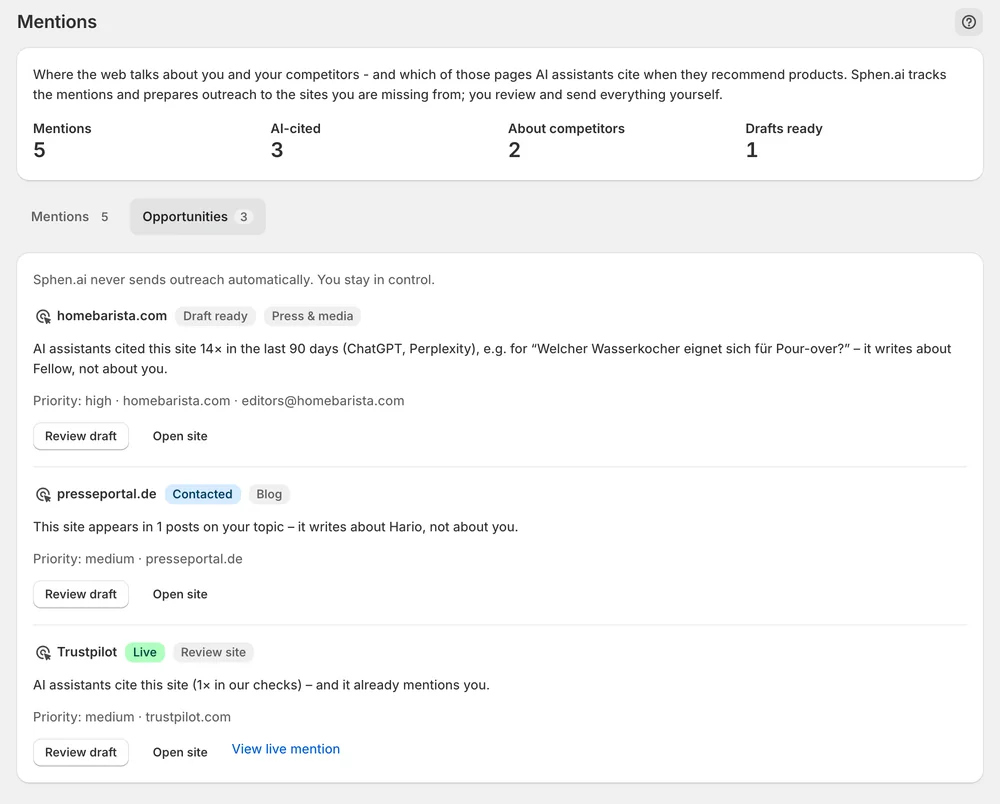
Mentions → Opportunities picks up sites AI cites that do not mention you yet, with the evidence and a draft you can edit.
In the app
On Analytics, open the AI visibility deep dives dropdown in the tab row and pick Sources. The page lists every external domain cited for your prompts. For each one you see the citations, the share and the engines. Sources is read-only. It shows who gets cited and changes nothing in your store. The counts come from sampled answers, so read the ranking, not a single count.
The Rankings deep dive carries the Cited domains table next to engine coverage. Here you see your own domain among the review sites and shops that were cited for the same prompts. Compare the table after each scan to see whether your domain moves. The review sites listed above you are the natural outreach targets for the next step.
Mentions → Opportunities picks up sites that AI assistants cite for your topics but that do not mention you yet. Each row shows an evidence line and a ready outreach draft. Press Review draft, adjust Subject and Outreach draft, and save. You send the email from your own inbox, then press Mark contacted. When coverage is live, add the link and press Mark live.
You stay in control
Plans
AI visibility tests per month
On Analytics, open the AI visibility deep dives dropdown in the tab row and pick Sources. The page has no entry of its own in the navigation. Rankings and Prompts open from the same dropdown, so you can switch between the three deep dives.
Use it as an outreach list. The domains AI cites instead of you are the pages worth being on. The Mentions workflow helps you get there: Opportunities lists those sites with evidence and a draft that you edit and send yourself.
Check Sources and the Cited domains table after later scans. Look at whether the domains you worked on now cite you and whether your own domain moves in the table. Citations are sampled, so judge the direction across several scans, not one result.
No. Each assistant cites a different set of sources. Sources shows the engines that cited each domain, so you can see whether a site matters for one assistant or for several. Rankings adds engine coverage per prompt. Use both to decide where outreach makes sense.
No. The workspace is draft-only. Sphen.ai writes the outreach draft and you decide what happens with it. You edit the subject and the text, send the email from your own inbox and track the status with Mark contacted and Mark live.
Monitoring for Mentions is set up for your store as part of onboarding and does not start on its own at install. Once it runs, the first opportunities take a few days to accumulate. If the tab stays empty after that, contact support.
Install Sphen.ai, let it read your store, and decide exactly what goes live.
