
What it does
An AI visibility scan asks real buyer questions to the AI engines your customers use and records whether your store appears in the answer, where it ranks, and which other domains got cited instead. One full scan covers five buyer prompts across five AI engines. Results land on three pages of their own — Rankings, Prompts and Sources — which have no navigation entry: you open them from the AI visibility deep dives dropdown in the tab row on Analytics.
Why it matters
Rank tracking tells you where you sit in a list of blue links. It says nothing about whether ChatGPT names your store when a buyer asks for a recommendation. The scan turns that into a number you can act on: if competitors and review sites are cited on your core prompts and you are not, the fix is a content and citation problem, not a bidding problem.
Setup
On Overview, find the AI visibility scan card and press Start scan now. The scan runs in the background — you can leave the page.
Review which questions are being asked. On Analytics, open AI visibility deep dives → Prompts and use the Custom prompts tab to see the prompt panel Sphen.ai generated from your catalog.
Add the questions your buyers really ask under Add a custom prompt: enter the prompt, pick an Intent and a Language, then press Add prompt. It joins the next scan.
Delete prompts that don't reflect your market with Delete. Results already collected stay in past runs.
When the scan finishes, open Analytics and work through Prompts, Rankings and Sources in that order — each from the AI visibility deep dives dropdown.
Use Sources to build an outreach list: the domains AI answers cite instead of you. Send them to the workflow described under Mentions.
Reading the results
The Visibility score is a sampled average: the share of sampled AI answers across engines that mention your store, scored out of 100. It is not an exhaustive crawl, so read the trend across scans rather than a single number. Share of voice answers a narrower question — of the store links AI answers cited, how many pointed at you.
Win rate is the sharpest metric on the page: of the answers that do mention you, the share that recommend you as the top pick. Being mentioned but never winning is a positioning problem, not a visibility problem.
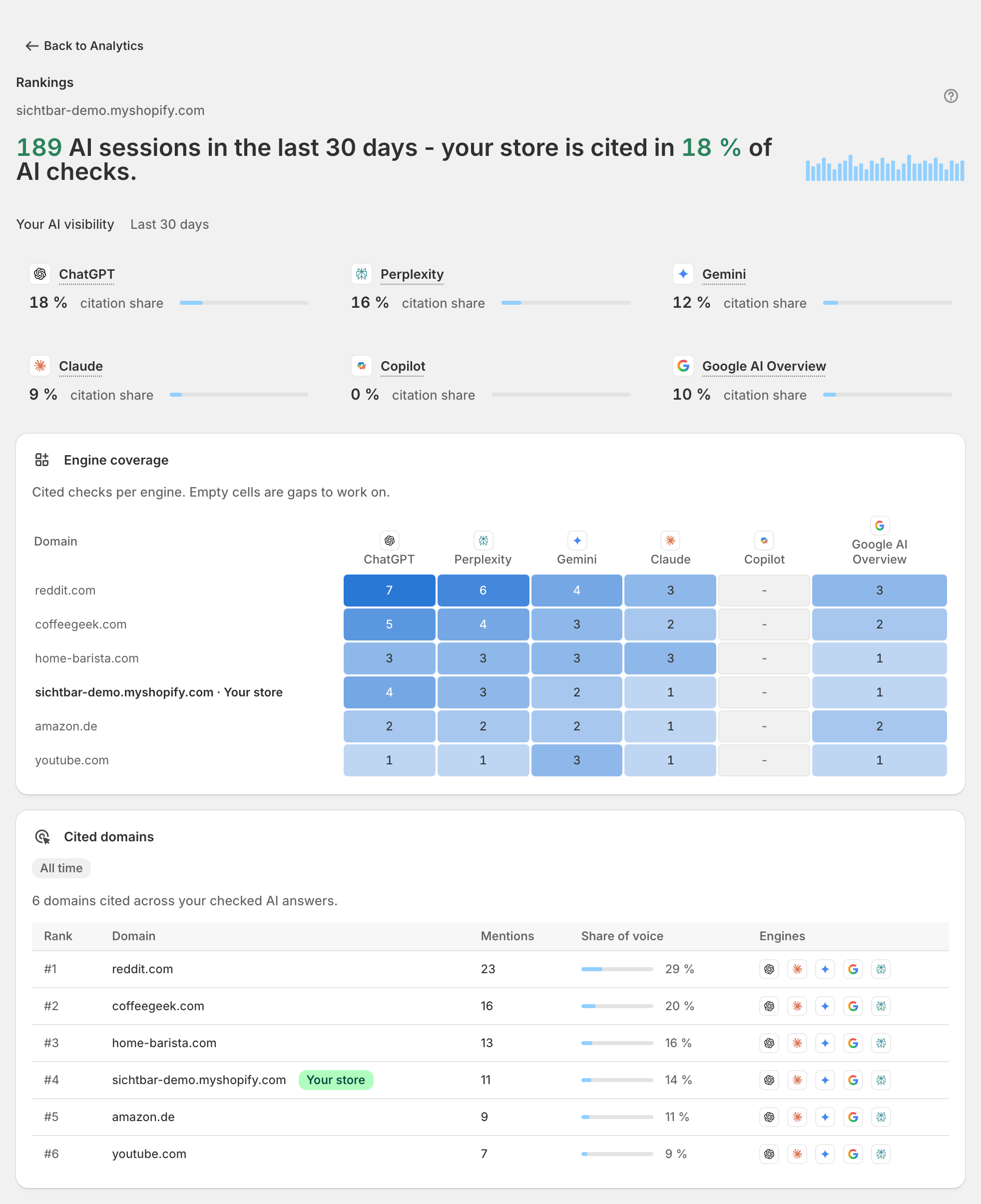
On the Prompts deep dive, some prompt rows carry a real-browser evidence badge — Verified in real browser, or Checked in real browser - not mentioned. Those prompts were re-asked in real guest-browser sessions of the ChatGPT and Gemini web interfaces, as a reality check against the API samples; the badge's tooltip names the engine and capture date. In Rankings, empty cells in the engine-coverage matrix are gaps worth working. A healthy picture: your own domain climbing the Cited domains table while the review sites above you turn into your outreach targets.
Troubleshooting
The scan has been queued for a long time.
The card shows Scan is taking longer than expected when a run is queued behind others. It finishes in the background; press Refresh or check Activity for the job. See Troubleshooting.
I hit my monthly scan limit.
Each plan includes a fixed number of full scans per month and the allowance resets at the start of the next month. Check what is left under Settings → Plans; see Plans & billing.
No results at all after a completed scan.
That is a real result, not an error: your store was not mentioned in any sampled answer. Start with Recommendations to close catalog gaps, then Content and Mentions to build citable material.
Frequently asked questions
Which engines are checked?
Results are broken down per engine for ChatGPT, Perplexity, Gemini, Claude, Copilot and Google AI Overview — on Overview as citation-share cards and on the Rankings deep dive under Engine coverage, and the real-browser re-checks shown as evidence badges on the Prompts deep dive cover the ChatGPT and Gemini web interfaces.
Why does the score move between scans without me changing anything?
AI answers are non-deterministic and the scan is a sample, not a census. Small movements are noise. Look for direction across several scans, and read Gainers and Losers on the Prompts deep dive for week-over-week movement that survived sampling. The AI Shopping tab carries the same movers per product, where that tab has been switched on for your store.
Can I track a competitor?
Indirectly, and that is usually enough. Competitors that appear in the same answers are listed per prompt under Competitors mentioned in the prompt details, and competing domains show up in Cited domains.
Still stuck?
Support answers installation, catalog sync, audit, billing, privacy, and account questions for the SPHEN.AI Shopify app.