
What it does
Content has two tabs. Blog builds an article plan from your own catalog — product types, collections, brands and coverage gaps — writes drafts in the background and publishes approved ones to a Shopify blog. FAQs drafts question-and-answer pairs that can be published to your storefront as a visible block plus matching structured data.
Why it matters
AI assistants quote pages that answer a question directly. Product pages rarely do; a buying guide or an FAQ block does. Articles planned from your catalog also fill the gap between what you sell and what people search for — and every published draft is a new surface that can be cited without you buying a single click.
Setup
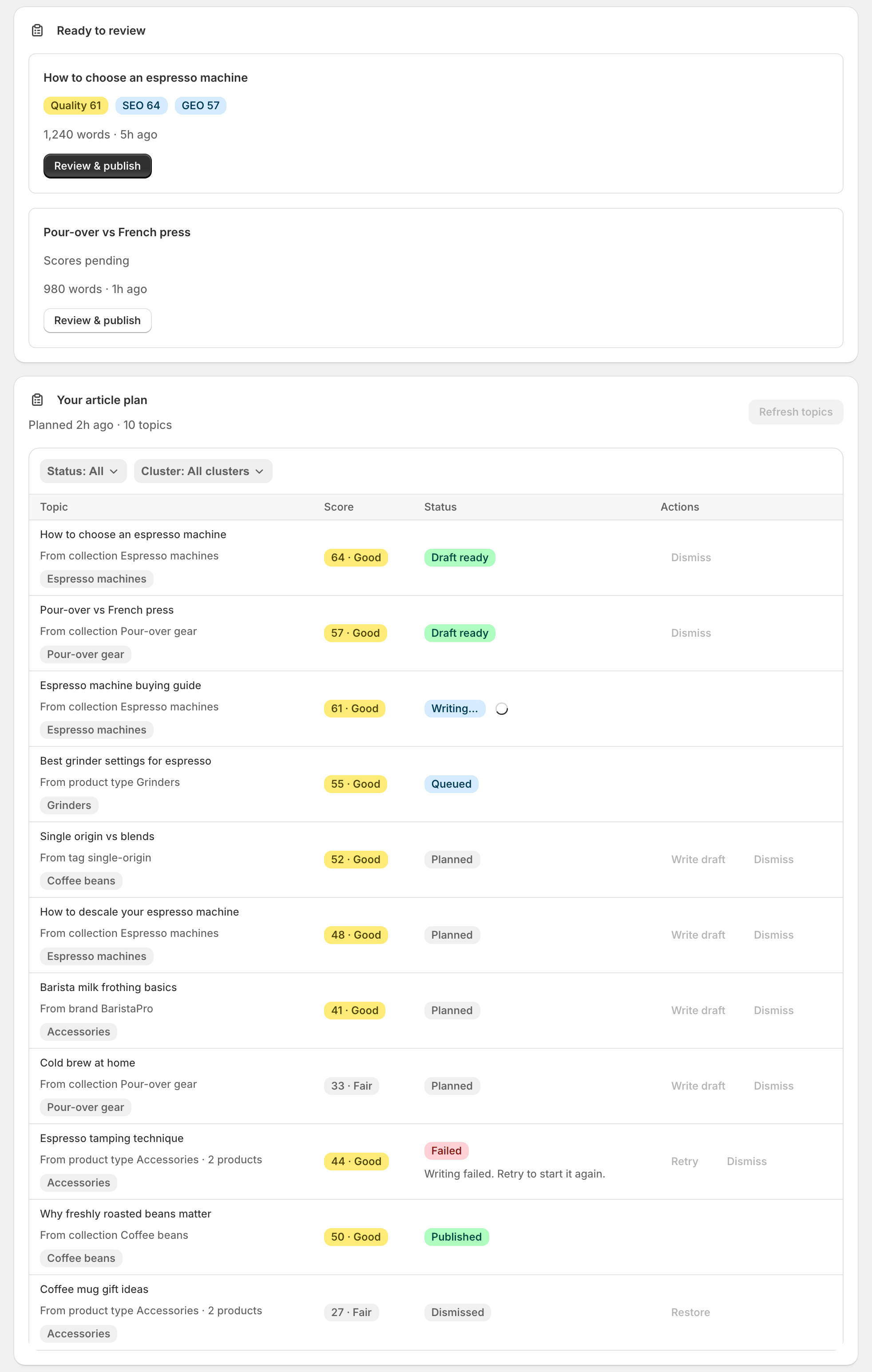
Open Content → Blog. Sphen.ai builds Your article plan from your synced catalog; press Refresh topics later to rebuild it.
Pick topics and press Write draft, or Write top 5 now to queue a batch. Drafts are written in the background — you can leave the page.
To commission something specific, use Write with AI, describe the article, and press Add to plan. Under Feature specific products you can pin up to three products — each pinned product is guaranteed a product card in the article, with live price, image and link. Everything else is still matched automatically from your catalog, and a pinned product that goes inactive or sells out is dropped rather than published.
Under Ready to review, open a draft with Review & publish. Use Edit for the title, meta description and article HTML, or Edit with AI with an instruction, then Rewrite with AI.
Choose a target under Publish to blog, then Check in theme to see the article in your live theme before it goes public. Publish with Publish now, or set a date and use Schedule.
Switch to the FAQs tab to review drafted answers, then approve and publish them. The visible FAQ block needs its own theme app embed — see Theme integration.
Reading the results
Each topic carries one opportunity score, shown as a band: Strong, Good or Fair. Write the strong ones first: they are the topics your catalog can actually support with evidence.
Drafts carry three numbers. Quality is the overall editorial check. SEO measures how well the draft targets its keyword in titles, structure and meta description. GEO measures how citable it is for AI assistants — direct answers, FAQs and structure. A publishable draft sits at Quality 85 or above with GEO 70 or above; those are exactly the thresholds auto-publish uses.
A draft marked This draft is not ready to publish failed the quality checks. Don't fix it by hand — go back to the plan, retry the topic or pick another.
Troubleshooting
The plan says there is not enough catalog signal.
The plan is built from product types, collections and store pages. Make sure the catalog sync finished, add products or collections, then refresh the plan later.
Publishing fails with a permissions error.
The app is missing write permissions for your online store. Reinstall or reopen the app from your Shopify admin to grant them, then publish again.
The article published, but its store URL shows 404.
The article is live in Shopify - your theme just has no blog or article template to render it with. Nothing has to be published again. See Blog pages return 404.
I republished an article and it stayed in the wrong blog.
Shopify cannot move published articles between blogs. The content was updated where the article already lives. Republishing also keeps the original title and URL handle unchanged.
Frequently asked questions
Can Sphen.ai publish articles without me?
Only if you switch it on. Auto-publish publishes drafts that pass Quality ≥ 85 and GEO ≥ 70 straight to a blog you nominate, with no review step. Without a review step the editorial responsibility stays with you, and depending on the topic EU rules may require the article to be labelled as AI-generated.
How many articles do I get per month?
It depends on your plan: 5 on Essential, 20 on Business, 30 on Growth. Current usage is under Settings → Plans; see Plans & billing.
Do FAQs need the theme embed?
The visible FAQ block and its FAQPage structured data ship as their own app embed (Sphen.ai FAQs) and render nothing until you enable it in the theme editor.
Still stuck?
Support answers installation, catalog sync, audit, billing, privacy, and account questions for the SPHEN.AI Shopify app.